Inspect Models
Models may be complex and built from many processes and variables. To better
explore those models, xarray-simlab provides many convenient ways to inspect and
auto-document Model objects.
As an example we’ll use here the object advect_model which has been created
in the previous Section Create and Modify Models of this user guide.
In [1]: import xsimlab as xs
Inspect model inputs
Model repr already gives information about the number and names of processes and their variables that need an input value (if any):
In [2]: advect_model
Out[2]:
<xsimlab.Model (4 processes, 5 inputs)>
grid
    spacing     [in] uniform spacing
    length      [in] total length
init
    loc         [in] location of initial pulse
    scale       [in] scale of initial pulse
advect
    v           [in] () or ('x',) velocity
profile
For each input, a one-line summary is shown with the intent (either ‘in’ or ‘inout’) as well as the dimension labels for inputs that don’t expect a scalar value only. If provided, a short description is also displayed in the summary.
The convenient property input_vars of Model
returns all inputs as a list of 2-length tuples with process and
variable names, respectively.
In [3]: advect_model.input_vars
Out[3]:
[('grid', 'spacing'),
 ('grid', 'length'),
 ('init', 'loc'),
 ('init', 'scale'),
 ('advect', 'v')]
input_vars_dict returns all inputs grouped by
process, as a dictionary:
In [4]: advect_model.input_vars_dict
Out[4]: {'grid': ['spacing', 'length'], 'init': ['loc', 'scale'], 'advect': ['v']}
Inspect processes and variables
For deeper inspection, Model objects support both dict-like and attribute-like access to their processes, e.g.,
In [5]: advect_model['advect']
Out[5]:
<AdvectionLax 'advect' (xsimlab process)>
Variables:
    v                [in] () or ('x',) velocity
    grid_spacing     [in] <--- grid.spacing
    u                [in] <--- profile.u
    u_advected      [out] ('x',)
Simulation stages:
    run_step

In [6]: advect_model.grid
Out[6]:
<UniformGrid1D 'grid' (xsimlab process)>
Variables:
    spacing     [in] uniform spacing
    length      [in] total length
    x          [out] ('x',)
Simulation stages:
    initialize
As shown here above, process repr includes:
the name to the process class and the name of the process in the model (top line) ;
a “Variables” section with all variables declared in the process (not only model inputs) including one-line summaries that depend on their type (i.e.,
variable,foreign,group, etc.) ;a “Simulation stages” section with the stages that are implemented in the process.
It is also possible to inspect a process class taken individually with
process_info():
In [7]: xs.process_info(ProfileU)
<ProfileU  (xsimlab process)>
Variables:
    u_vars      [in] <--- group 'u_vars'
    u        [inout] ('x',) quantity u
Simulation stages:
    run_step
    finalize_step
Similarly, variable_info() allows inspection at the
variable level:
In [8]: xs.variable_info(ProfileU, 'u')
Quantity u

Variable properties:

- type : ``variable``
- intent : ``inout``
- dimensions : ('x',)

Other attributes:

- units : m

In [9]: xs.variable_info(advect_model.profile, 'u_vars')
Iterable of all variables that belong to group 'u_vars'

Variable properties:

- type : ``group``
- intent : ``in``
- default value : ()
Alternatively, you can look at the auto-generated docstrings of a process class
(configurable via the autodoc parameter of process()):
In [10]: ProfileU?
Init signature: ProfileU(*, u_vars=(), u) -> None
Docstring:
Compute the evolution of the profile of quantity `u`.

Attributes
----------
u_vars : :class:`attr.Attribute`
    Iterable of all variables that belong to group 'u_vars'

    Variable properties:

    - type : ``group``
    - intent : ``in``
    - default value : ()

u : :class:`attr.Attribute`
    Quantity u

    Variable properties:

    - type : ``variable``
    - intent : ``inout``
    - dimensions : ('x',)

    Other attributes:

    - units : m
Init docstring: Method generated by attrs for class ProfileU.
File:           ~/checkouts/readthedocs.org/user_builds/xarray-simlab/checkouts/stable/doc/scripts/advection_model.py
Type:           type
Subclasses:     ProfileU
As well as the auto-generated docstrings for each variable (only accessible from Model objects), e.g.,
In [11]: advect_model.profile.u?
Type:        property
String form: <property object at 0x7f61b8b708f0>
Docstring:
Quantity u

Variable properties:

- type : ``variable``
- intent : ``inout``
- dimensions : ('x',)

Other attributes:

- units : m
Like input_vars and
input_vars_dict, Model properties
all_vars and
all_vars_dict are available for all model
variables, not only inputs.
Visualize models as graphs
It is possible to visualize a model and its processes as a directed graph (note: this requires installing Graphviz and its Python bindings, which both can be found on conda-forge):
In [12]: advect_model.visualize();

show_inputs option allows to show model input variables as yellow
square nodes linked to their corresponding processes:
In [13]: advect_model.visualize(show_inputs=True);

show_variables option allows to show the other variables as white
square nodes:
In [14]: advect_model.visualize(show_inputs=True, show_variables=True);

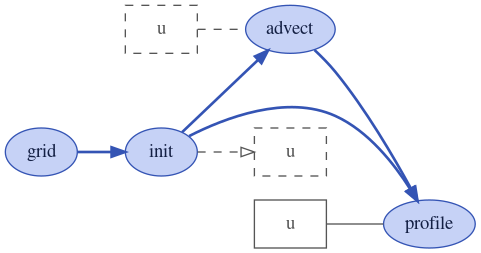
Nodes with solid border correspond to regular variables while nodes
with dashed border correspond to foreign variables. 3d-box nodes
correspond group variables. Variables connected to their process with
an arrow have a value computed by the process itself (i.e.,
intent='out').
A third option show_only_variable allows to show only one given
variable and all its references in other processes, e.g.,
In [15]: advect_model.visualize(show_only_variable=('profile', 'u'));
Note that there is another function dot_graph available in module
xsimlab.dot which produces similar graphs and which has a few more
options.